
使用 root 用户输入下面命令安装或卸载
bash <(curl -s -L https://git.io/v2ray.sh)若上述命令失效,则使用如下命令 :
wget -N --no-check-certificate https://raw.githubusercontent.com/Dabric-MG/v2ray/master/install.sh && bash install.sh或者使用下述备用命令:
git clone https://github.com/Dabric-MG/v2ray -b master
cd v2ray
chmod +x install.sh
./install.sh local
按照提示安装即可!
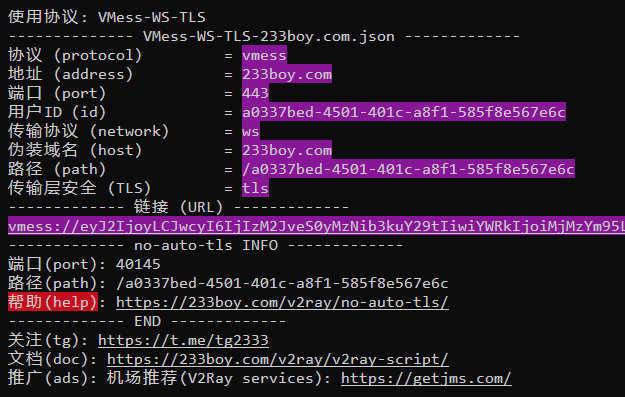
使用 v2ray no-auto-tls 添加一个配置,会生成类似如下图片所示的内容
ngnix配置文件(旧的):
location / {
        proxy_redirect off;
        proxy_pass http://127.0.0.1:27874;#WebSocket监听的端口
        proxy_http_version 1.1;
        proxy_set_header Upgrade $http_upgrade;
        proxy_set_header Connection "upgrade";
        proxy_set_header Host $http_host;
        }
ngnix配置文件(新的)
# 在 location 后填写 /你的 path
	location /你的 path {
	if ($http_upgrade != "websocket") {
		return 404;
	}
        proxy_pass http://127.0.0.1:1234;
	proxy_redirect off;
        proxy_http_version 1.1;
        proxy_set_header Upgrade $http_upgrade;
        proxy_set_header Connection "upgrade";
        proxy_set_header Host $host;
        proxy_set_header X-Real-IP $remote_addr;
        proxy_set_header X-Forwarded-For $proxy_add_x_forwarded_for;
        proxy_read_timeout 5d;
    }
魔改BBR加速脚本命令(附加):
wget -N --no-check-certificate https://raw.githubusercontent.com/Dabric-MG/YankeeBBR/master/bbr.sh && bash bbr.sh install然后根据提示重启系统,重启完成后, 启动魔改版BBR
bash bbr.sh start查看BBR运行状态
sysctl net.ipv4.tcp_available_congestion_control如果看到有 tsunami 就表示开启成功!
BBR plus版安装命令:
wget -N --no-check-certificate "https://raw.githubusercontent.com/Dabric-MG/Linux-NetSpeed/master/tcp.sh" chmod +x tcp.sh
./tcp.sh
完成后,检查运行状态:
./tcp.sh 微信扫一扫打赏
 支付宝扫一扫打赏